Spend less time decoding noise

Orizone Pulse
Orizone Pulse
Are your teams prioritizing the most reported issue, or the one with the greatest impact?Did the latest update solve the problem players cared about?Are early reviews telling the whole story?When does community feedback become a trust problem?Are players reacting to the game, or to the promise they expected?Before launch, what story are players and creators already telling about the game?
Player perception intelligence
Pulse brings clarity, cohesion, and faster decisions to player feedback.
Less time spent cross-checking sources. Teams reach the same read faster. More focus on improving the game and its reception.
Put teams in front of the same issues and opportunities
Shared Read
Teams share an up-to-date view of the issues and opportunities identified by players, with one space to understand, agree, and decide together.React faster with the right context
Reactivity
When the field read is already structured and shared, teams can respond faster: communicate, fix, adjust, deliver, or clarify for players.Support retention and growth conditions
Impact
Better decisions support title, studio, and publisher image, player retention, word of mouth, and the conditions for sales growth.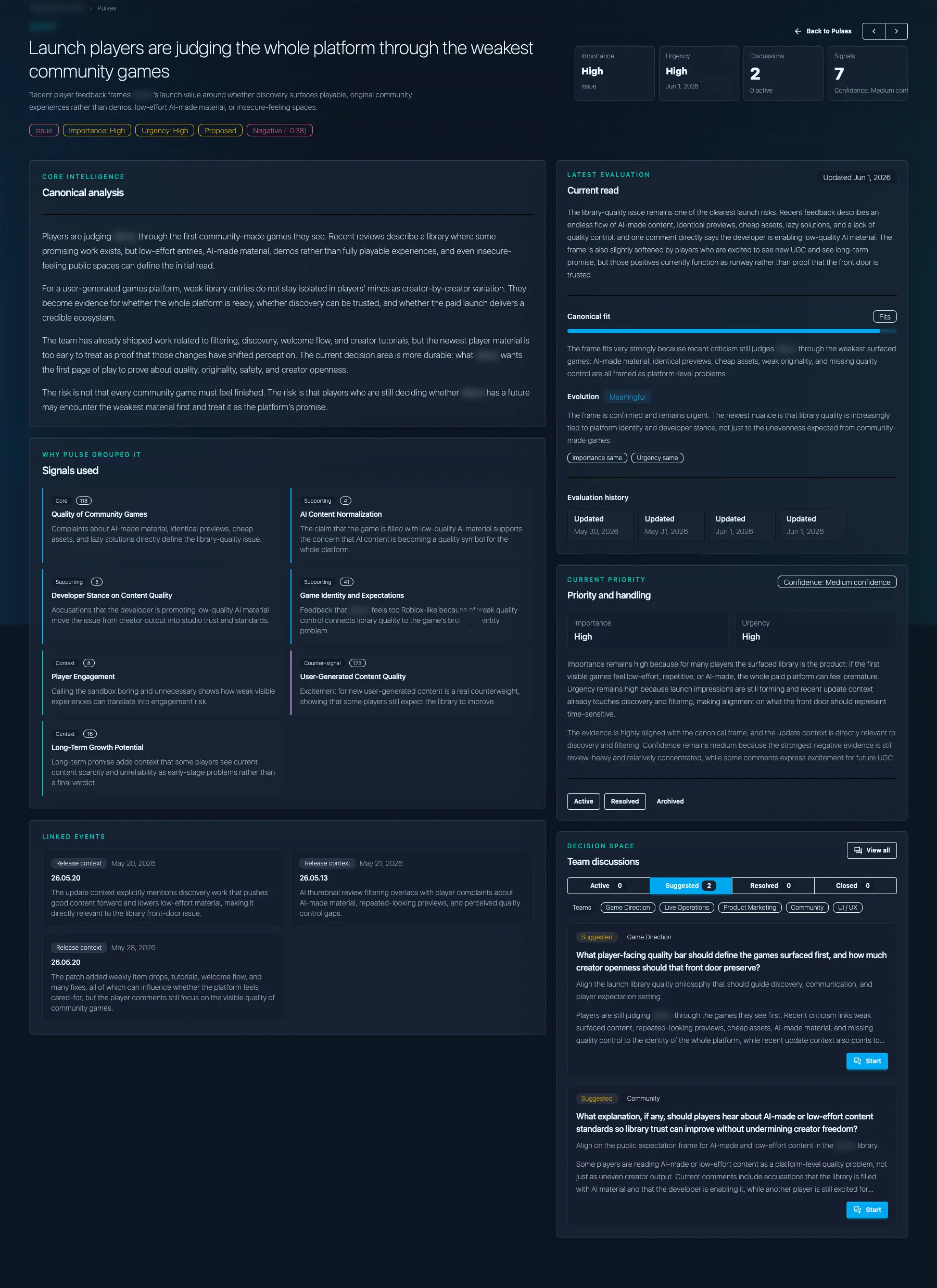
From player feedback to game decisions
Analysis teams can use to understand, prioritize, and decide.
From pre-launch conversations to reviews, community reactions, updates, and live operations, Orizone Pulse turns scattered player signals into structured Pulse Analyses that game direction, development, production, publishing, marketing, and community teams can use to reach the same read faster and decide with more confidence.
A Pulse Analysis shows what changed, why it matters, and who needs to align.
Each read keeps evidence, context, confidence, and response space in one inspectable object so teams can move from public perception to internal decision.
Inside the artifact
A Pulse Analysis shows what changed, why it matters, and who needs to align.
Each read keeps evidence, context, confidence, and response space in one inspectable object so teams can move from public perception to internal decision.
How it works
From scattered feedback to decision-ready intelligence.
Pulse continuously collects player feedback from the sources that matter for your game, maps it into grounded evidence, connects recurring patterns into evolving signals, and refreshes Pulse Analyses as perception changes across updates, campaigns, incidents, and lifecycle moments.
Continuously refreshed as player perception changes over time.
01
Sources
Start with Steam reviews, then expand to community spaces, video comments, social conversations, private Discords, or internal context when needed.
02
Evidence
Player feedback is broken down into specific, traceable pieces of evidence instead of being reduced to generic summaries.
03
Signals
Related evidence is grouped into evolving signals that track what players are reacting to, how strongly, whether the topic is gaining, fading, or shifting, and how that movement changes after important game events.
04
Pulse Analysis
Signals are interpreted in context to produce a decision-ready read: what is happening, why it matters for this game, which teams are concerned, and what actions or discussions should follow.
Every Pulse Analysis stays connected to the evidence behind it and the movement that changed it, so teams can move faster without losing the trail.
Source options
Listen where your players already are.
Pulse currently supports Steam reviews and YouTube video sourcing, then expands source coverage by module, scope, and roadmap across community discussions, private Discords, social reactions, or games media coverage.
Each source adds a different layer of understanding.
Storefront Reception
Where purchase decisions, recommendation, friction, and review pressure become visible.
Communities
Where recurring concerns, player stories, trust issues, and deeper debates take shape.
Creators & Influencers
Where announcements, streams, short-form reactions, and creator framing shape expectation.
Games Media & Press
Where articles, reviews, and specialized coverage add comparison points, genre context, and media perspective.
Pulse is designed for analytics, not content republishing. We minimize retained raw third-party content and keep analyses connected to source references and derived evidence, so teams get traceability without treating platform or player content as something Pulse owns.
Use cases
One shared read. Every team sees what matters to them.
Pulse gives game direction, production, development, publishing, marketing, community, and leadership the same interpretation of player perception, so each team can make better decisions from its own angle.
Team decision view
Creative and game direction teams need to know whether public perception matches the experience they are trying to create.
What they need to know
Whether players are reading the intended world, difficulty, pacing, tone, and promise of the game in the way the team expects.How Pulse helps
Pulse connects scattered reactions to show what players understand as intended, and where their expectations move away from the experience the team wants to create.Decision it supports
What to preserve, clarify, rebalance, reposition, or reframe before the perception gap becomes part of the game's identity.Pulse is not separate reports for each department. It is one decision-ready interpretation that different teams can use from their own angle.
Pulse Preview
See what Pulse reveals about your game.
Share your game, its current context, and the questions your team is already trying to clarify. We will prepare a focused preview from your reality to show how Pulse can help your teams understand, prioritize, and decide.
For qualified studios and publishers. If the preview shows real value for your teams, we then scope access around your title, sources, cadence, and support needs.
Prepared around your game
The conversation starts from your title's context, not from a generic product tour.
Centered on the Pulse Analysis
You see the decision object Pulse produces, including how evidence, signals, and team response connect.
Clear next step after the preview
If the preview confirms Pulse is relevant, we define the right scope for your title: source coverage, analysis cadence, team access, and support.